



Get the Link to This Publication
-
-
You can copy and paste this link into any site, or bookmark it online or offline with any service.
- Done
This product requires a minimum order of 8.
This will be reflected in your shopping cart.

This will be reflected in your shopping cart.
Digital Includes:
PDF
WebViewer
- Details
- Description
- Published by:
- Ethan Lee
- Published:
- 10/18/2026
- Specs:
-
Flyer / 8.25" x 10.75"2 pages
- Category:
- Computers
- Tags:
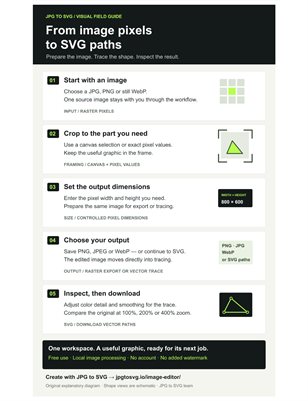
A five-step visual guide to preparing an image and turning it into SVG paths: choose the source, crop the useful area, set output dimensions, choose raster export or vector tracing, and inspect the result before downloading.
The workflow follows JPG to SVG's free browser tools. You can crop and resize an image, export PNG, JPEG or WebP, or carry the edited image directly into SVG tracing. Image processing runs locally, with no account or added watermark.
Original explanatory graphic by the JPG to SVG team. The shapes are schematic illustrations. The PDF contains links to the editor and the full-size guide. A blank second page was added to meet the publication format.


